











The Easywin login page is where returning users sign in to manage their betting account. Once inside, you can place bets, check results, deposit or withdraw funds, and review your transaction history. Everything tied to your personal account starts here, so knowing how to reach it and what to do if something goes wrong saves time.
This guide explains the login process, password recovery, registration, mobile access, and the main issues that can block entry. If you are new to the platform, the registration section will help you create an account before your first sign-in.
Easywin Login Page
The login page on easywins-ng.com is the standard entry point for returning users. You will need the email address or phone number tied to your account, plus your password. No extra software or plugin is required; a modern browser on desktop or mobile is enough.
Always open the official page by typing the address yourself or using a bookmark you saved. Phishing pages can copy the look of a real sign-in form, so check the address bar before entering details. If the page looks unfamiliar, close the tab and reopen it from a fresh window.
How to Log In to Your Account
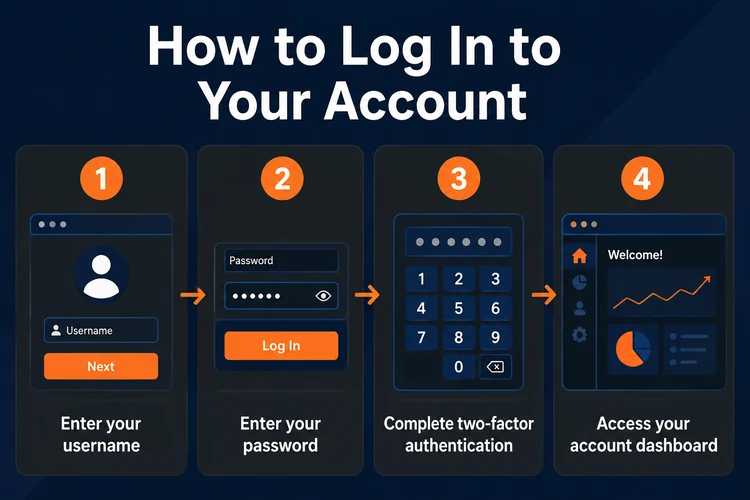
Signing in takes less than a minute when your details are ready. The steps below cover a normal login and help you avoid common typing mistakes.
Before you begin, make sure your browser is up to date and that caps lock is off. If you are using a shared device, clear saved details after you finish.
- Step 1: Open the Easywin login page in your browser.
- Step 2: Enter your registered email address or phone number in the first field.
- Step 3: Type your password in the password field. Check for accidental spaces or caps lock.
- Step 4: Tap the login button.
- Step 5: Once authenticated, you land on your account dashboard.
If the page redirects you back to the login form without an error message, clear your browser cache and try again. Stored cookies from a previous session sometimes interfere with a fresh login attempt.
After signing in, you can move to the parts of the site you need, such as bet history or the cashier for deposits and withdrawals.
Password and Security
Your password is the main barrier between your account and anyone who might try to access it. Choose something long enough to resist guessing: a mix of letters, numbers, and at least one symbol works better than a simple word or date of birth.
Do not reuse the same password across several sites. If another service is exposed, leaked credentials are often tried elsewhere next. A password manager is safer than writing the password in a notebook or saving it in plain text on your phone.
If you share a device, log out after each session and close the browser tab. That matters on borrowed phones and public computers, where an open session may stay active longer than you expect. If the platform offers additional checks on your device, use them.
Forgot Password and Password Reset
If you cannot remember your password, use the reset option on the login page. Select Forgot password and enter the email address or phone number linked to your account. Easywin will send a code or a reset link to that contact method.
Open the message, follow the instructions, and create a new password. The old one stops working once the change is confirmed, so you will need to sign in again with the updated details. If the message does not arrive quickly, check your spam folder and confirm that the phone number or email address on file is still active.
After the reset, update any saved password in your browser or password manager. That prevents repeated failed attempts the next time you sign in.
Creating an Easywin Account
Registration comes before your first login. New users need to provide basic details such as name, email address, phone number, and a password. You must be 18+ to register, and it is better to use contact details you can access later if you ever need a reset.
Once the form is complete, you can sign in with the same details you just created. Some accounts may need email or phone verification before full access is available, so keep an eye on your inbox or messages after sign-up. If you miss the first verification message, request a new one rather than guessing at the login stage.
Easywin Mobile Login
Logging in from a smartphone works the same way as on desktop. Open the mobile browser, go to the login page, and enter your details. On a smaller screen, the form is easier to read and tap, which helps when you are signing in on the move.
If you prefer an app-based experience, open the mobile app and use the same account details you use on the website. The key point is consistency: one account, one password, and the same verification rules wherever you sign in.
Common Login Problems
Most login failures come down to a few predictable issues. It helps to check the basics before trying anything complicated.
Before you contact support, try the simple checks below. They solve many login problems without waiting for another message or device change.
- Wrong password: Re-type it carefully. Watch for caps lock, extra spaces, or a keyboard that changed the character layout. If you are not sure, reset the password instead of guessing several times.
- Page not loading: Check your internet connection first. Switch between Wi-Fi and mobile data, refresh the page, or try another browser. If the page still does not open, the issue may be temporary.
- Account not verified: Some new accounts need email or phone confirmation before they can be used. Look for the original verification message and complete that step before trying again.
- Too many failed attempts: After repeated errors, the login form may slow down or lock for a short time. Wait a few minutes, then try again with the correct details.
- Browser compatibility: Older browsers may not display the form properly. Update your browser or open the page in a different one if fields or buttons do not respond as expected.
If none of these steps work, reach out through the contact page with the email or phone number linked to your account and a short description of what happens on screen. Do not share your password in the message.
Security Recommendations
Keeping your account safe is mostly about habits. Never give your password to friends, relatives, or anyone who messages you outside the official site. A real support agent will not ask for your password.
Check the address bar each time you log in and use only the official page. Bookmarking the correct page reduces the chance of landing on a copycat site from a search result or forwarded link. If you sign in on shared devices, always log out before you leave.
Change your password now and then, especially if you suspect that someone else has seen it. If you receive a password reset message you did not request, treat it as a warning sign and update your login details right away.
FAQ
Open the login page, enter the email address or phone number linked to your account, type your password, and tap the login button. If your details are correct, you should go straight to your account area. Always use the official page and avoid saved links you do not recognise.
Yes. Users in Nigeria can open the Easywin login page on easywins-ng.com, enter the details tied to their account, and sign in from a desktop browser or a phone. If you save the page, make sure the address is correct before you enter any personal information.
Yes. The mobile app uses the same account details as the website. Install the app on your device, open it, and sign in with the email or phone number and password you registered with. Keep your credentials consistent so you do not create confusion between app and browser access.
Select the Forgot password option on the login page and enter the email address or phone number attached to your account. Follow the message you receive, create a new password, and sign in again with the updated details. Check your spam folder if the reset message is delayed.
Go to the registration page and fill in your name, email address, phone number, and password. You must be 18+ to register. After the form is submitted and any verification step is completed, you can return to the login page and use the new details.
Start with the basics: check your password, confirm caps lock is off, and make sure your internet connection is stable. If the page still will not accept your details, reset the password or try another browser. If the problem continues, contact support with the account details that were used.